Showing posts with label Hard Drive. Show all posts

Easy Ways to Turn Off Hard Disk Drive When Idle In Windows 10, With 5 Easy Steps

Why do we turn off our PC / Laptop Hard Disk?, this aims to save electricity or battery consumption. 
For you Windows 10 users, you can take advantage of the settings in Power Options to turn off the hard disk when there is no activity for a certain period of time.
This option is known as Turn Off Hard Disk after is a part of the power management choices of the current power plan. The user can control it, turn on or turn off it. It depends on the required power plan, it can be turned on or turn off out of the box. For instance, it is turned on in the Balanced and Power Saver power profiles, and turned off in the Performance power plan. So, do you need this feature?

Here are 5 easy steps to turn off the Hard Disk Drive when Idle in Windows 10

1. Open Windows Run (Win Key + R key), then type powercfg.cpl
Open Windows Run (Win Key + R key)
Open Windows Run (Win Key + R key), then type powercfg.cpl
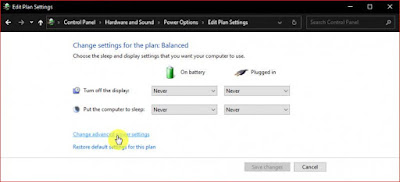
2. Click the Change plan settings option, adjust to the power plan that will be used
Click the Change plan settings option, adjust to the power plan that will be used
3. Click on the option Change advanced power settings
Click on the option Change advanced power settings
4. Open the Hard disk menu, then you will find settings to set how long the hard disk will turn off after a few minutes without read / write (idle) activity. You can set when the device is connected (Plugged in) or not connected to an electric current (On battery). Click OK to save the settings
settings to set how long the hard disk will turn off
5. Done

When the activity on the hard disk drive stops, there will be a delay of several seconds before the disk rotation on the hard disk drive will move again. However, you should also note that this feature will not work on Solid State Drives (SSD) or Non-Volatile Memory Express (NVMe).

That's an easy way to turn off the Hard Disk Drive when Idle in Windows 10. Hopefully this simple information can help you.
Read more...

Intel SSD 750 Series NVMe 2.5Inc 400GB

Currently the SSD is not a curiosity anymore. SSD stands for Solid-State Drive, which can be defined as a data storage medium that uses memory gabar steady or no memory (Non Volatile Memory) as a medium, and not using a magnetic disk as a conventional hard disk, (wikipedia). SSD (Solid State Drive) are available in the market today are very diverse. SSD manufacturers competing to offer the advantages of the products they create, start in terms of storage capacity up their stretcher technology. One of the technologies that are currently being offered is relatively new SSD manufacturers today is the technology NVMe (Non Volatile Memory Express). The new technology is expected to provide a different experience this time SSD users, especially for professional users.

Intel SSD 750 Series NVMe 2.5Inc 400Gb
Virtually all SSD manufacturers are now carrying NVMe technology. One of the leading manufacturers Intel processor and is one of the pioneers of the advent of SSD technology, has launched the SSD technology that carries NVMe which they labeled Intel SSD 750 Series. 750 Series is available in two options, the PCIe card shaped and shaped 2.5Inc. Which will be discussed this time is with a capacity of 400GB 2.5Inc. Specifications of both it would not be much different, the difference is the form factor 2.5Inc equipped with different connectors, namely U.2. The connectors which already has the standardization of NVMe SSD. Intel SSD 750 Series is expected to provide data transfer rates 4-5 times faster than usual without technology NVMe SSD.

Some of the fittings are included when you buy it, among others; NVMe Driver CD, user manual, M.2 connector cable, and a cable connector on the motherboard U.2 that has been equipped with connectors U.2.
Intel SSD 750 Series NVMe 2.5Inc 400Gb in Box
Intel SSD 750 Series has a dimension of 2.5 Inc. SSD is indeed quite thick enough compared to other 2.5-inch SSD with a thickness of 15mm. That is because the SSD is equipped with a cooling system in it. In terms of specifications, the 750 Series is equipped with 128Gbit chip 20nm MLC NAND controller made by Intel itself. To maximize the performance of SSD NAND production Intel already supports TRIM and Garbage Collection.

Excess Intel SSD 750 Series including; Performance is very strong, Tech NVMe for desktop users, supported with TRIM and Garbage Collection technology, and no less important is the long warranty.

A disadvantage of the Intel SSD 750 Series is; U.2 and M.2 connector slot available on the motherboard just top class. And the production of SSD is more inclined to the user to go professional.
Read more...

WD Blue 1 TB Desktop Hard Drive ( WD10EZEX )

WD Blue 1 TB Desktop Hard Drive: 3.5 Inch, 7200 RPM, SATA 6 Gb/s, 64 MB Cache - WD10EZEX
WD Blue 1 TB Desktop Hard Drive
This drive is quiet and the sequential performance is very good, though the seek time is average. From HDtune the average seek time is 20ms. Pretty great for a moderately priced 1 TB spinner. With capacities ranging from 80 GB to 1 TB, these drives are the perfect solution for family and business computing.


Product Features :
  • WD Blue hard drives have a multitude of features including third generation SATA interface with 6 GB/s transfer rate, plus rock solid performance and ultra-cool and quiet operation.
  • WhisperDrive technology minimizes noise to levels near the threshold of human hearing.
  • SoftSeek technology streamlines read/write seeking algorithms, resulting in more efficient operation.
  • 1 TB capacity holds up to 200,000 digital photos, 250,000 MP3 files, and 120 hours of HD video.
Ideal for :

  • Family and business computing
  • Adding storage in desktop PCs or external drives
  • Adding extra storage space for photos, videos and music
WD Blue 1 TB Desktop Hard Drive: 3.5 Inch, 7200 RPM, SATA 6 Gb/s, 64 MB Cache - WD10EZEX
WD Blue 1 TB Desktop Hard Drive: 3.5 Inch,
7200 RPM, SATA 6 Gb/s, 64 MB Cache - WD10EZEX
WD Blue 1 TB Desktop Hard Drive ( WD10EZEX ) are tested and recommended for use in PCs, high-performance workstations and notebook computers.

Pick the drive that suits your needs with the confidence in knowing that all WD Caviar Blue drives are built to the highest standards of quality and reliability. WD Blue hard drives are available with a SATA interface in a variety of cache sizes with a multitude of available features to deliver rock solid performance and ultra-cool and quiet operation.
Read more...

Western Digital My Passport 2 TB USB 3.0 Portable Hard Drive -WDBY8L0020BBKNESN (Black) Review

Western Digital My Passport 2 TB USB 3.0 Portable Hard Drive
Western Digital My Passport 2 TB USB 3.0
Portable Hard Drive


The Western Digital My Passport 2 TB is an amazing way to bring large amounts of data in the small container, that is certainly always available and also secure. I really like it's dimensions, both physically and in bytes.

Western Digital My Passport features up to 2 TB total capacity in the extremely small enclosure. It capabilities ultra-fast USB 3.0 connectivity, compatibility with USB 2.0 connectivity,
 automatic, backup software, password protection and hardware encryption to be able to help protect your own files from unauthorized usage.

Compatible for :

Formatted NTFS for Windows® XP, Windows Vista,® or Windows 7
Requires reformatting for Mac OS® X Leopard® or Snow Leopard™, or Lion
Note: Compatibility may vary depending on user's hardware configuration and operating system.

Ideal for :
 
    Transferring files in blazing fast speed with USB 3.0
    Connecting to USB 2.0 devices today and USB 3.0 devices when you're ready
    Backing up your files with automatic, continuous backup software
    Securing your files from unauthorized access with password protection and hardware encryption
    Adding extra storage for your videos, music, photos, and files
    Connecting and powering through your USB 3.0 or USB 2.0 interface

WDigital My Passport 2 TB Portable Hard Drive Product Features and Technical Details :

Product Features :

  • Sleek, compact design
  • Automatic backup software
  • Password protection and hardware encryption

Technical Details :

  • Brand Name: Western Digital
  • Model: WDBY8L0020BBK-NESN
  • Hard Disk Size: 2 TB
  • Hard Disk Description: Portable
  • Weight: 0.23 Kilograms


Why the Western Digital My Passport 2 TB USB 3.0 Portable Hard Drive ??
Western Digital My Passport 2 TB USB 3.0 Portable Hard Drive - Capacity
Western Digital My Passport 2 TB USB 3.0 Portable Hard Drive
Capacity

Large capacity, sleek design and style
Offering large capacity in the compact drive, My Passport is the ideal companion for everyone with many different videos, photos, music, and data files that they want to help protect and also take on the street.

 Automatic backup
WD's automatic, continuous back-up software performs quietly in the background to help protect your computer data using minimal PC resources. Whenever you put or modify a file, it can instantly backed up.

Ultra-fast transfer rates
Any time connected to the USB 3.0 port, My Passport allows you to access and save data files in high speed. Decrease transfer time by up to 3 times when compared with USB 2.0 transfer rates.
Western Digital My Passport 2 TB USB 3.0 Portable Hard Drive - Backup
Western Digital My Passport 2 TB USB 3.0 Portable Hard Drive
Backup
Password protection secures your drive
Use WD Security™ to be able to set security password protection and hardware encryption and protect your data files by unauthorized use and also access.

USB 3.0 and USB 2.0 compatibility
With this single portable drive you get compatibility with your USB 2.0 devices today and also the ultra-fast speed of USB 3.0 when you’re ready to improve to a higher generation.

Automatic, continuous backup software
WD's automatic backup software performs quietly without your knowledge to help protect your data using minimum PC resources. When you add or modify data file, it is quickly backed up.

WD Security™
WD Security utility permits you to set security password protection and also hardware encryption for your personal drive to safeguard your data files from not authorized use or access.

WD Drive Utilities™
Register your current drive, set drive timer, run diagnostics and much more using WD Drive Utilities.
Western Digital My Passport 2 TB USB 3.0 Portable Hard Drive - Security
Western Digital My Passport 2 TB USB 3.0 Portable Hard Drive
Security
USB-powered
Powered completely from the USB port on your personal computer. Not any separate power supply is required.

WD quality inside and out
We understand your data is very important for you. So we develop the drive inside to our challenging requirements for durability, shock tolerance, and also long-term stability. Then we protect the drive using a durable enclosure designed for style and also protection.

Pros :
Smart form-factor. Very small and sleek for the 1TB drive.
USB powered ( only plug it into your USB port). Doesn't need a power cable connection or bulky ac adapter. Makes for real portability.
Amazing USB 2.0 speed during my initial back up of 131 GBs worth of data files Or content.
Automatic file backup feature.
1 USB cable connection( supplied)supports both 3.0 and 2.0.
Surprisingly silent and also works fairly cool too.
Excellent customer service. I called two times and spoke to help well prepared And professional technicians.

Cons :
WD Smartware software. Surprisingly so - so during this cool tiny device. Much less intuitive or slick when i experienced expected or learn about.
This version of Smartware is not really very flexible and does not include a complete system backup( system image)feature. I had to setup a different application to make a system image ( Luckily WD provides a free copy of an application called Acronis for its customers - however I had to contact customer service to learn about this application and stay told finding this on their support page.
Automatic backup feature will only work while your system is idle.
Read more...

Western Digital My Passport Essential SE 1 TB USB 3.0 Portable External Hard Drive Review

Finally, ten times the speed of USB2! Super Speed USB consortium called, to distinguish it (not) from Hi-Speed and Full Speed of USB2 USB1. But not so fast, Dark-Helmet. First, just because the interface is ten times faster does not mean the drive, and second, the possibility that even a 2010 PC you need an adapter card in PCIx. And if not, the USB port will be behind the computer, which may be a problem because the cable that comes in this package only 16 "long. If you need more, you have to buy a Micro USB 3.0 cable, connector at the end of the drive is different than USB2. Now, the cable is a rare, if any, are expensive, so be careful not to misplace that you have. Western Digital My Passport Essential SE 1 TB USB 3.0 Portable External Hard Drive works with both USB2 and USB3.
Western Digital My Passport Essential SE 1 TB USB 3.0 Portable External Hard Drive
Looks like a cigarette holder with a glossy finish. One terabyte is fitting in your jeans pocket. This device looks like a cigarette holder with a glossy finish. Rounded edges, and the usb connector opening just in case. It would be super neat to have a rubber flap over the usb and it may be more matte anti-scratch, but there is a problem here, especially since WD offers a cheap hard shell case and neoprene. Western Digital My Passport Essential SE 1 TB USB 3.0 Portable External Hard Drive is designed for today with tomorrow in mind.

My Passport Essential SE 1 TB USB 3.0 Portable External Hard Drive comes with some software on it (as a replacement installation CD) that does two things: enable hardware encryption and backup. The good news here is that WD seems this software ships with all their external drive now, so it makes sense / hope that they will fix it and you'll be able to download the upgrade. If you're a Mac or Win7 Ultimate users, you do not need the WD software at all, just use the built-in items.

My Passport Essential SE 1 TB USB 3.0 Portable External Hard Drive requires no external power, and quite handsome. It's amazing how they fit 1 TB drive in such a small package.
WD My Passport Essential SE 1TB USB 3.0 Portable External Hard Drive Box
If you only want to use the drive as a plain old storage drives. You just connect the drive to a PC, if you are using Windows 7, OS complains with "WD SES Device USB Device - No driver found", but it shows the contents of the hard anyway. So, you can simply use the drive without having to do anything.

Product Features

  • Automatic, continuous backup 
  • Maximum capacity 
  • Connectivity today; speed for tomorrow 
  • Dual USB 3.0 and USB 2.0 compatibility 
  • Up to 3x faster transfer rates with USB 3.0

Technical Details

  • Brand Name: Western Digital
  • Model: WDBACX0010BBK-NESN
  • Hard Disk Size: 1 TB
  • Hardware Platform: PC
  • Hard Disk Interface: ATA
  • Width: 6.00 inches
  • Height: 2.00 inches
  • Weight: 0.75 pounds

Western Digital My Passport Essential SE 1 TB USB 3.0 Portable External Hard Drive is a fantastic little device: a full terabyte, compact and reasonably future-proof, even though you may not want to bother with USB3 for now if you do not already have it.
Read more...

Hard Drive - A Little Definition

Hard Drive

Hard Drive

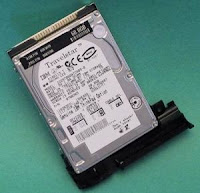
Hard drive is a secondary storage media where data is stored in the form of an integrated magnetic metal on the disk (Hard Disk) that rotates. Currently Oxide disk made of material made with magnetic materials technology (Thin Film).

In a hard disk, there are usually more than one disc to enlarge the capacity of the stored data. Data is stored in a concentric circle, called tracks. And this track is divided into several segments, known as sectors. 


Hard Disk Component
Hard Disk Component
In the normal operation of reading data from and write to disk, hard disk uses a device called a head to do it. Head is made with Head photolothografi process is in each dish. Head is the next move looking for sector-specific sector to operate. The time required to find the sector - in hard disk sectors called Seek Time. Once the desired sector is found, then the head will rotate to look for tracks. Time to look for tracks is called Latency. Hard Drive is designed to be used as data storage media in the big capacity. If opened, visible eyes hard disk in tip-handled arm attached to the disk that can spin data stored in the hard disk will not be lost when not given voltage. Usually the hard drive is located inside the computer's internal devices, but now the hard drive can also be installed outside the computer using a USB cable, or who is often called the Portable Hard Drive. 

In essence, hard drive is a secondary data storage media which has a large capacity and has a read-write speeds are fast. 
Read more...